Concierge reward redemption
A shopping assistant can redeem one reward on a member’s behalf, capped to a specific pass, quantity, and value. It receives no wider account access.
Developers
One REST API issues and updates Apple Wallet and Google Wallet passes from your backend. Signed webhooks tell you when members install passes, earn points, or redeem rewards. Examples below are in Node.js and Python — flip the switch on any code sample to change languages everywhere on the page.
01 · Architecture
walletKit is server-to-server. Your API key authenticates your platform, not an end user, so it must never reach a browser, mobile app, URL, log line, or analytics event.
01
Members and staff use your existing app and session. It never sees a walletKit key.
02
Holds WALLETKIT_API_KEY, enforces your own permissions, and calls walletKit server-to-server.
03
Issues and updates Apple Wallet and Google Wallet passes, then signs events back to you.
Use API responses for immediate UI state. Use webhooks to reconcile what happens later — wallet installs, removals, and expiries — rather than waiting on an event for a request you just made.
02 · Credentials
Sign in and open Integrations. Both secrets are shown exactly once — walletKit stores only a hash of the API key.
Credentials → Rotate API key. Send it as the X-API-KEY header. Rotating stops the previous key immediately, so deploy the new one in a planned window.
Webhooks → Rotate signing secret. An existing secret keeps signing for five more minutes, so accept both until the new one activates.
sk_live_ key and every pass you issue is real. Use a dedicated test template, or the dashboard's Test issuance tab, while you build.# Server-side secrets only — never ship these to a browser or mobile app.
WALLETKIT_API_URL=https://passera-service-production.up.railway.app
WALLETKIT_API_KEY=sk_live_...
WALLETKIT_TEMPLATE_ID=<template-id>
WALLETKIT_WEBHOOK_SECRET=whsec_...03 · Quickstart
No SDK needed yet — a thin helper over fetch (Node.js) or requests (Python) is all it takes. It sends the key, unwraps the response envelope, and turns API errors into exceptions.
// walletkit.mjs — server-side only. Node.js 18+ (built-in fetch).
const BASE_URL = process.env.WALLETKIT_API_URL;
const API_KEY = process.env.WALLETKIT_API_KEY;

export class WalletKitError extends Error {
  constructor(status, message) {
    super(message);
    this.status = status;
  }
}

export async function walletkit(path, { method = 'GET', body } = {}) {
  const response = await fetch(new URL(path, BASE_URL), {
    method,
    headers: {
      'X-API-KEY': API_KEY,
      'Content-Type': 'application/json',
      Accept: 'application/json',
    },
    body: body ? JSON.stringify(body) : undefined,
    signal: AbortSignal.timeout(15000),
  });

  // Every response uses one envelope: { success, data, meta?, error? }.
  const payload = await response.json();
  if (!response.ok || !payload.success) {
    const message = [].concat(payload.error?.message ?? 'walletKit request failed').join('; ');
    throw new WalletKitError(response.status, message);
  }
  return payload.data;
}
Upsert by your own member ID. Calling it again for the same externalUserId updates the existing pass instead of creating another.
import { walletkit } from './walletkit.mjs';

// Creates the member's pass, or updates it if one already exists for this ID.
const pass = await walletkit('/passes/upsert', {
  method: 'POST',
  body: {
    externalUserId: 'member_4821', // your own stable member ID
    templateId: process.env.WALLETKIT_TEMPLATE_ID,
    wallets: ['apple', 'google'],
  },
});

// Store pass.id against the member. Send the browser only the links.
console.log(pass.id, pass.links);
// { public: 'https://…/public/passes/…', apple: 'https://…/apple', google: 'https://…/google' }
Render links.apple and links.googleas plain links — “Add to Apple Wallet” and “Add to Google Wallet”. Direct navigation preserves the wallet handoff; a link is null when that wallet is not enabled.
import { walletkit } from './walletkit.mjs';

const passId = process.env.PASS_ID;

// A unique reference makes retries safe: it is never applied to a pass twice.
await walletkit('/wallet-pass-points/earn', {
  method: 'POST',
  body: { passId, points: 10, reference: 'order_1042', reason: 'Purchase' },
});

const { balance } = await walletkit('/wallet-pass-points/' + passId + '/balance');
console.log('balance', balance);
04 · Webhooks
walletKit POSTs a JSON envelope to your HTTPS endpoint, signed with HMAC-SHA256 over the raw request body. Your receiver should:
Read the raw bytes
Verify before any JSON middleware parses or re-serializes the body.
Compare in constant time
Check X-Webhook-Signature against every active secret.
Deduplicate the event ID
Delivery is at least once. Use a unique constraint on the ID.
Accept, then process
Return 2xx once the event is stored. Do slow work in a queue.
// webhook.mjs — npm install express
import crypto from 'node:crypto';
import express from 'express';

import { acceptOnce } from './inbox.mjs'; // INSERT ... ON CONFLICT (event_id) DO NOTHING

// Accept the previous secret too while a rotation is activating.
const SECRETS = [
  process.env.WALLETKIT_WEBHOOK_SECRET,
  process.env.WALLETKIT_WEBHOOK_SECRET_PREVIOUS,
].filter(Boolean);

function isValidSignature(rawBody, header) {
  const received = Buffer.from(header || '');
  return SECRETS.some((secret) => {
    const digest = crypto.createHmac('sha256', secret).update(rawBody).digest('hex');
    const expected = Buffer.from('sha256=' + digest);
    return expected.length === received.length && crypto.timingSafeEqual(expected, received);
  });
}

const app = express();

// express.raw keeps the exact bytes walletKit signed. Do not JSON-parse first.
app.post('/webhooks/walletkit', express.raw({ type: 'application/json' }), async (req, res) => {
  if (!isValidSignature(req.body, req.get('X-Webhook-Signature'))) return res.sendStatus(401);

  const event = JSON.parse(req.body.toString('utf8'));
  if (req.get('X-Webhook-Id') !== event.id) return res.sendStatus(400);

  const isNew = await acceptOnce(event); // store durably, process asynchronously
  res.sendStatus(isNew ? 202 : 200);
});

app.listen(process.env.PORT || 4000);
Delivery rules
createdAt and your own state to reconcile.05 · Events
Your endpoint receives every event below; filter on the envelope's type. The current schema version is 2026-09-01.
| Event | Meaning |
|---|---|
| pass.created | A pass was issued. |
| pass.installed | A member saved the pass to Apple Wallet or Google Wallet. data.wallet says which. |
| pass.removed | A pass was removed from a wallet or device. |
| pass.expired | A pass expired on one or more wallets. |
| member.created | A new member joined your business. |
| points.earned | Points were added to a pass. |
| points.redeemed | Points were spent. |
| points.adjusted | A manual correction changed a balance. |
| reward.earned | A catalog reward was awarded. |
| reward.redeemed | A catalog reward was redeemed. |
POST /webhooks/walletkit
X-Webhook-Id: e61cb6a2-73c1-48da-9758-54c3ab809b8f
X-Webhook-Event: pass.created
X-Webhook-Signature: sha256=<hex HMAC-SHA256 of the raw body>

{
  "id": "e61cb6a2-73c1-48da-9758-54c3ab809b8f",
  "type": "pass.created",
  "apiVersion": "2026-09-01",
  "createdAt": "2026-09-11T02:39:12.690Z",
  "data": {
    "passId": "956e73b5-b674-400b-9340-3d0bd29bd196",
    "externalUserId": "member_4821",
    "templateId": "58ceb2ff-ba61-4deb-b645-6cd3d3042d75",
    "passType": "loyalty",
    "status": "active",
    "wallets": ["apple"]
  }
}
06 · MCP
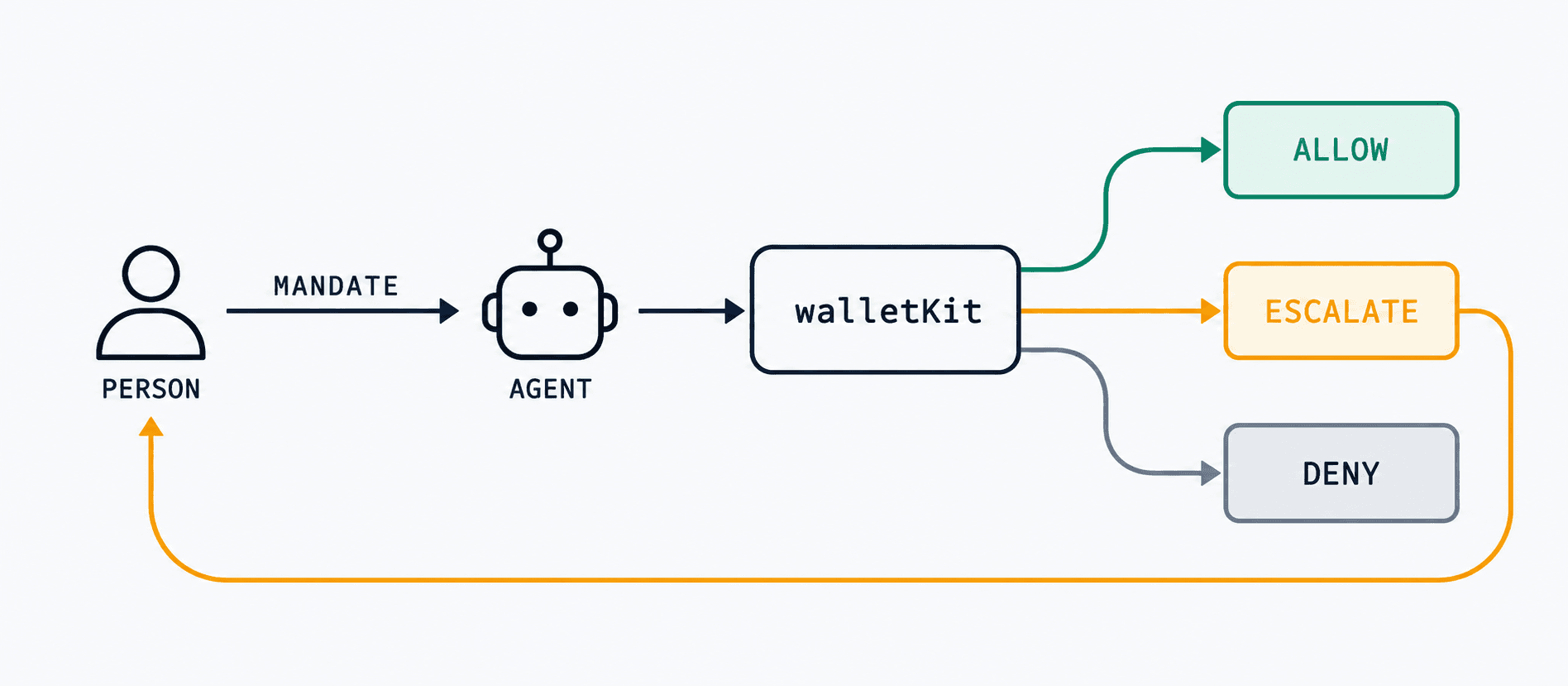
Agentic Pass is walletKit's delegated-authority layer for software agents. The walletKit MCP server gives assistants a consistent way to discover and use its loyalty and membership tools. Every action is checked against a signed mandate that says which member the agent represents, what it may do, how much it may spend, and when that authority ends.
When an AI agent redeems a reward or renews a membership, it needs proof of what that member is entitled to. A compromised or over-eager agent cannot widen the authority it was given. The mandate API is live today at /api/v1/mandates/*; there is no client library for it yet, so the calls below use the same fetch/requests helper as everything else on this page.
Read the thinking behind it in Acquisition Is Being Automated. Retention Is What's Left.
The human is always the holder
A mandate names a principalId (the member) and an agentId (the software acting for them). The agent can act; it can never become the pass holder.
Scope is set once, at issue time
authorizationDetails caps what the agent can do: pass class, purpose, max_spend or max_quantity, and a ttlSeconds expiry. A request outside that scope is denied, not widened.
A threshold routes to the human
Set an approval_thresholdbelow the mandate's ceiling. Requests under it proceed; requests over it come back as ESCALATE with an authReqId to poll or approve.
Retries can't grind past a refusal
Enforcement is idempotent per mandate and request. An identical retry replays the stored decision, including a stored denial, with isReplay: true.
Agentic Pass use cases
A shopping assistant can redeem one reward on a member’s behalf, capped to a specific pass, quantity, and value. It receives no wider account access.
A support agent can issue goodwill credit below an approval threshold. Larger requests return ESCALATE and wait for the human principal.
A parent can let a family assistant check a shared balance or redeem points without sharing a login. Revoking the mandate removes only the agent’s authority.
A booking agent can renew access or present a pass for check-in. The business trusts the signed mandate tied to the member, not an assumed agent identity.
An aggregator can ask what a person is entitled to and whether it may act, using one mandate model across multiple loyalty and membership relationships.
Fraud containment is enforced
Scope is fixed when the mandate is issued and enforced on the server. A prompt-injected or faulty agent cannot claim more authority. The request is allowed, escalated, or denied, and every decision is written to the audit trail.
import { walletkit } from './walletkit.mjs';

// Issue a scoped delegation: this agent may act for this member, only for
// loyalty reward redemptions, only up to £100, and only for one hour.
const { token } = await walletkit('/api/v1/mandates/issue', {
  method: 'POST',
  body: {
    principalId: 'member_4821',       // the human — always the holder
    agentId: 'agent_concierge_01',
    authorizationDetails: [{
      type: 'pass_action',
      pass_class: 'loyalty',
      purpose: 'reward redemption',
      max_spend: 100,
      currency: 'GBP',
      approval_threshold: { spend: 50 }, // above this, the human is asked
    }],
    ttlSeconds: 3600,
  },
});

// Later, from the agent: spend within the mandate's own terms.
// Requests over max_spend are denied; between the threshold and the ceiling
// they come back as ESCALATE with an authReqId for the human to approve.
const result = await walletkit('/api/v1/mandates/enforce', {
  method: 'POST',
  body: {
    mandateToken: token,
    passClassId: 'loyalty',
    spend: 20,
    purpose: 'reward redemption', // must match what the mandate granted
  },
});

console.log(result.decision); // 'ALLOW' | 'DENY' | 'ESCALATE'| decision | What it means |
|---|---|
| ALLOW | Within the mandate’s ceiling and under its approval threshold. The pass action goes ahead immediately. |
| ESCALATE | Over the approval threshold, still under the mandate’s ceiling. Comes back with an authReqId — poll or wait for the human principal to approve or deny. |
| DENY | Over the mandate’s ceiling, the wrong purpose, an expired or revoked mandate, or a signature that doesn’t verify. |
// decision: "ALLOW" — spend was within the mandate and under its threshold
{
  "decision": "ALLOW",
  "reason": "Pass successfully issued under mandate mnd_… bound to human principal member_4821",
  "mandateJti": "mnd_ede6563865e344f9b913cd2b35ddfb3f",
  "principalId": "member_4821",
  "agentId": "agent_concierge_01",
  "pass": { "id": "c5d417e6-…", "status": "active", "urls": { "…": "…" } },
  "auditHash": "91c8c766…"
}

// decision: "ESCALATE" — over the £50 approval_threshold, under the £100 ceiling
{
  "decision": "ESCALATE",
  "reason": "Request exceeds approval threshold. Escalation pushed to human principal.",
  "authReqId": "ciba_3a5f531145d542f792be775b9cac32eb",
  "auditHash": "23f2d414…"
}

// decision: "DENY" — over the mandate's own ceiling
{
  "decision": "DENY",
  "reason": "Requested spend (250) exceeds mandate ceiling (100)",
  "auditHash": "e7c469dd…"
}

// A retried request with the same mandate + same request details replays the
// stored outcome instead of re-evaluating — a retry loop cannot turn a
// stored "no" into a "yes".
{ "decision": "DENY", "reason": "…", "isReplay": true }
Also available: POST /api/v1/mandates/revoke (immediate, by jti), GET .../status?token=, GET .../audit/{jti} for the full decision history, and GET .../holder-passes to list what a principal already holds. This surface is new and will keep moving. Treat it as early access rather than a stable v1.
Official SDKs
Coming soonTyped clients for Node.js and Python, covering passes, points, webhooks, and mandates in one package. Until then, the walletkit.mjs/walletkit.py helper above is deliberately small enough to copy straight into your project.
07 · Endpoints
All accept X-API-KEY. The key already identifies your business, so omit businessId. Every parameter and schema is in the full API reference.
| Method | Path | Use it to |
|---|---|---|
| POST | /passes/upsert | Issue or update a member’s pass. The recommended default. |
| POST | /passes | Issue an additional, distinct pass for the same member. |
| GET | /passes · /passes/{id} | List passes or fetch one, including its status and wallet links. |
| PATCH | /passes/{id} | Change display data, status, or enabled wallets. Devices refresh automatically. |
| GET | /passes/{id}/activity | Installs, scans, points, and status changes for one pass. |
| GET | /templates | Pass designs available to your business. |
| GET | /rewards | Your reward catalog. Filter by isActive, kind, scope, or templateId. |
| GET | /wallet-pass-points/{passId}/balance | Current points balance. /ledger returns the history. |
| POST | /wallet-pass-points/earn · /redeem | Add or spend points. Always send a unique reference. |
| POST | /pass-rewards/{passId}/{rewardId}/earn · /redeem | Award or redeem a catalog reward on a pass. |
Pass status is one of active, paused, renewal, pastDue, expired, ended, or archived. Each pass's QR code resolves to its live record, so a scan always reflects the latest status.
08 · Errors & retries
Keep walletKit's status and path in your server logs, and return your own stable, non-sensitive error shape to your UI.
// Success
{ "success": true, "data": { ... }, "timestamp": "2026-09-11T00:00:00.000Z" }

// Success, paginated
{ "success": true, "data": [ ... ],
  "meta": { "total": 42, "page": 1, "limit": 20, "totalPages": 3 },
  "timestamp": "2026-09-11T00:00:00.000Z" }

// Error — message is a string, or an array for validation errors
{ "success": false,
  "error": { "code": 400, "message": ["wallets must be an array"], "path": "/passes/upsert" },
  "timestamp": "2026-09-11T00:00:00.000Z" }
429 and 5xx
Retry with exponential backoff and jitter.
400, 401, 403, 404, 409
Do not retry. Fix the request, credentials, or state first.
Pass issuance
Do not retry blindly — concurrent upserts are not yet deduplicated. On a timeout, look the member up with GET /passes?search=<externalUserId> before issuing again.
Points
Retry only with the same reference. A reference is never applied to a pass twice.
09 · Go live
Ready to issue your first pass?
Create a workspace, rotate a key, and follow the quickstart.